Set up your voicemail
Turn voicemail on or off, choose a greeting, get transcripts and summaries, and set a PIN for desk phones.
Written By Axel Molist
Last updated About 1 month ago
Your voicemail box is on by default. Voicemails land in History under the Voicemail filter, and can be transcribed, summarised and emailed to you.
Steps
Go to Settings > Voicemail.
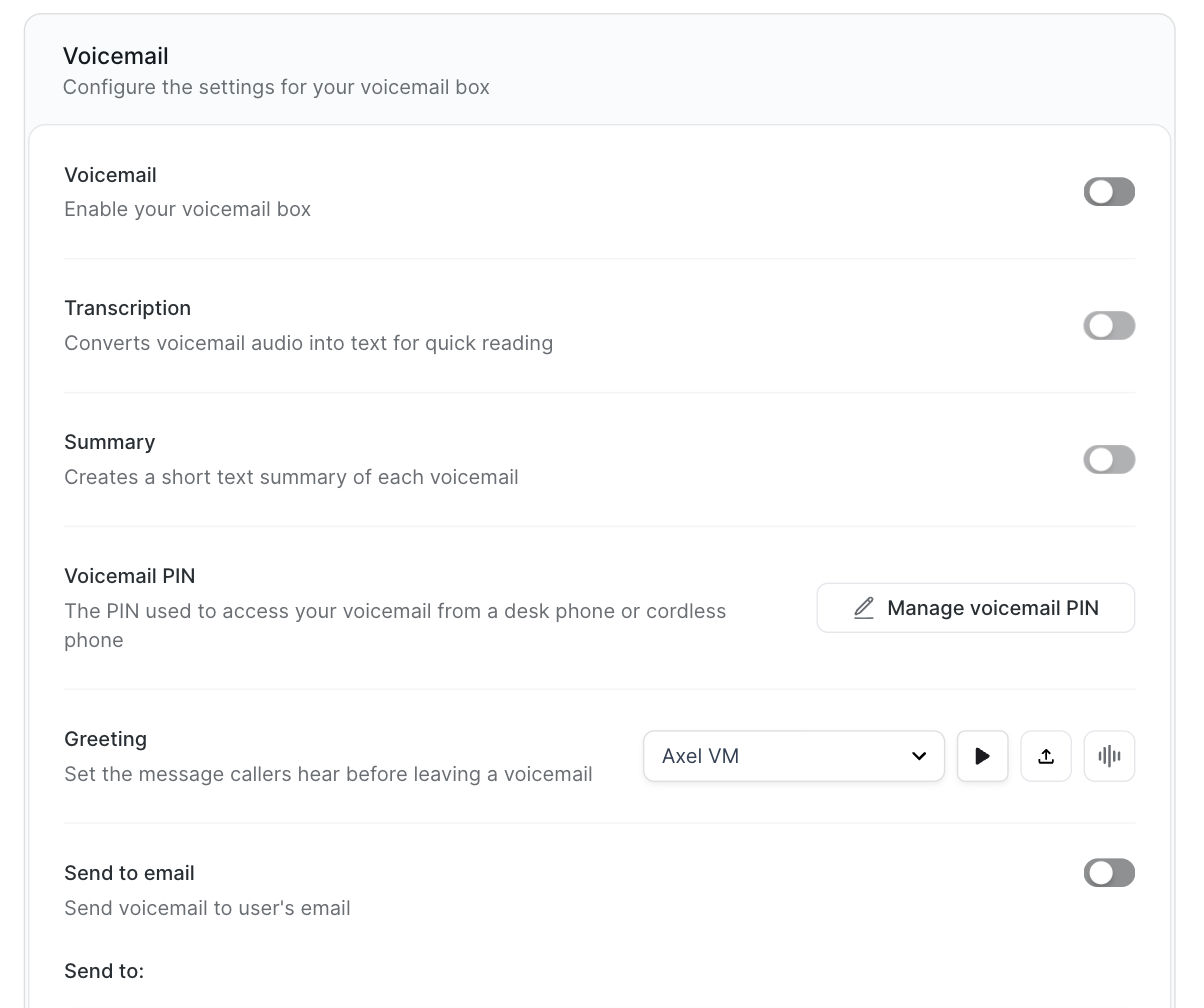
Voicemail turns the box on or off. With it off, unanswered calls follow your divert settings instead.
Transcription turns the audio into text you can read in History. Summary adds a short summary above the transcript. Both need the Plus or Unlimited plan.
Greeting is what callers hear before the tone. Pick a saved greeting from the list, press play to check it, upload a recording, or record one now with the microphone icon.
Send to email sends each voicemail to your email address.
Click Save.
Listen from a desk phone
If you use a desk or cordless phone, you'll need a PIN to reach your voicemail from it. Click Manage voicemail PIN, set a PIN, and save.
Read voicemails in History
Open History and click Voicemail. Each one shows who called, when, and a summary heading. Click it to play the message or read the transcript.
Good to know
Voicemail transcripts and summaries are processed on Olatti's own infrastructure in UK data centres, the same as your calls.
Related
Was this helpful?
Still need help? Ask the team