Add a number
Get an extra UK number for a new line, a campaign or a colleague's direct dial.
Written By Axel Molist
Last updated About 1 month ago
Every plan includes one UK number. Extra numbers are an add-on, and you can have as many as you need: a second line for a new service, a number for an advert so you can see what it brings in, or direct dial numbers for the people customers ring most.
Steps
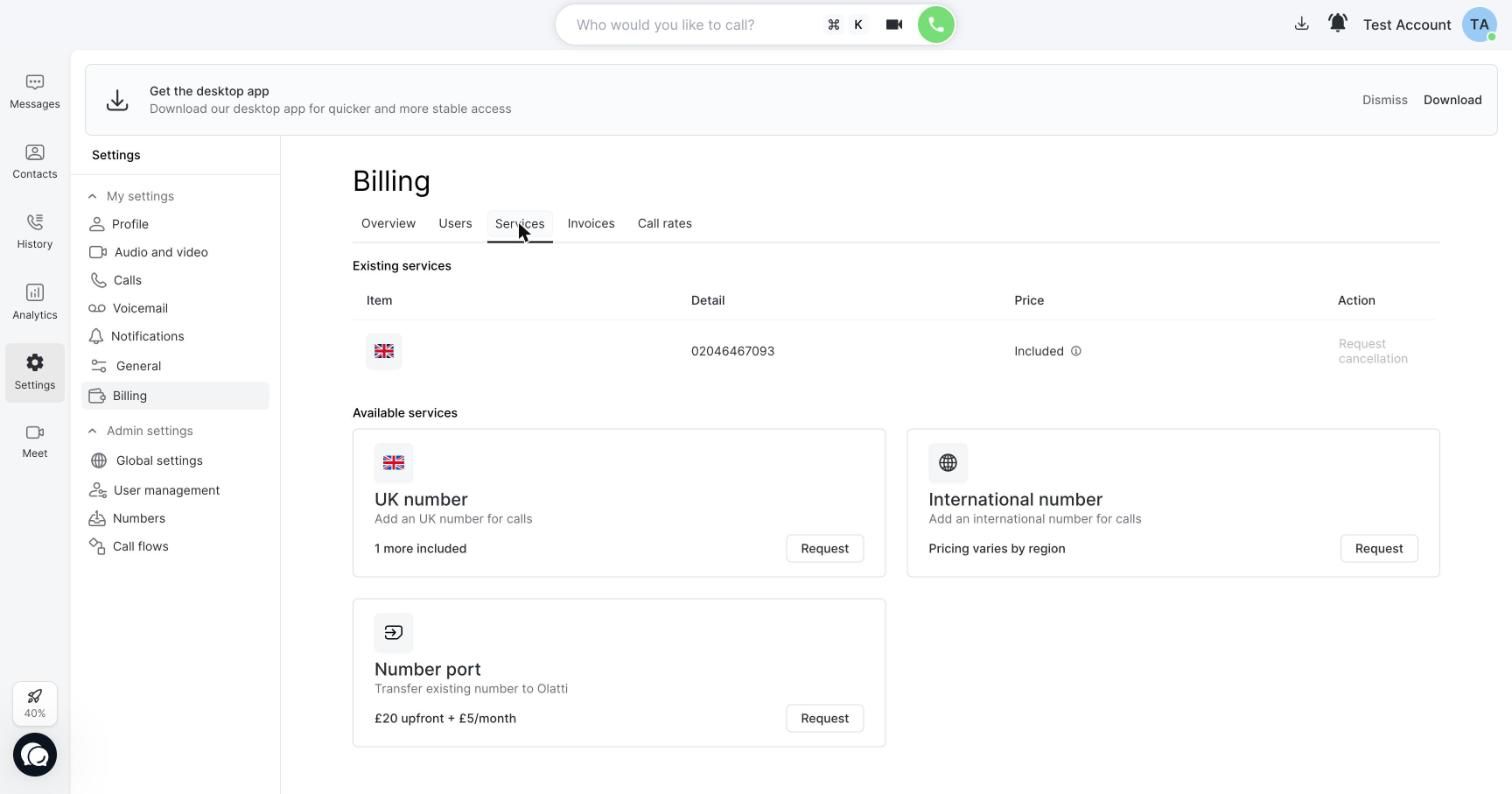
Go to Settings > Billing and open the Services tab. Under Available services you'll see UK number, with how many more are included in your plan, and International number.
Click Request on the one you want. We add the number to your account and it appears under Existing services and in Settings > Numbers.
Assign it: to a person as their direct line, or to a call flow. See Assign a number to a person or a call flow.
Bringing a number you already have
If the number exists on another provider, port it instead of adding a new one. Porting is free and the number keeps working throughout. See Port your number to Olatti.
Good to know
Extra numbers are billed monthly alongside your plan.
A new number can take a short while before emergency calls work on it. Keep another way to call 999 in the meantime, and give us the address to register against it.
Numbers stay yours to use for as long as you're a customer, and you can port them out if you leave.
Related
Was this helpful?
Still need help? Ask the team